











SnapState for Mac
- Paid
- 4.5
- 1
- V2.7.1
Download for Mac
View an ad to download for free

- SnapState
Restore Mac windows and tabs after sleep or monitor reconnect
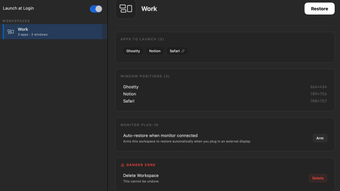
SnapState is a native Swift menu bar app for macOS that saves your workspace and puts it back after sleep, wake, or a monitor change. It remembers window positions and sizes, which apps were open, how your displays were arranged, and every open tab in Safari, Chrome, Edge, Brave, Arc, and other Chromium browsers. When your Mac wakes, when a display connects or disconnects, or when a known arrangement appears again, SnapState can restore that layout automatically. You can also restore a saved layout by hand with Control-Command-1 through Control-Command-6.
Docked MacBooks and multi-monitor setups often end up with every window piled onto the laptop screen after sleep or undocking, even when macOS keeps the display arrangement. SnapState is built for that case. It matches displays by identity when it can, then translates window frames so your layout returns to the right screens. Workspaces are stored locally as JSON on your Mac; there is no account required to use the app.
SnapState saves windows on every Space and restores each Space when you switch to it. It restores all open tabs per window in supported browsers (not Firefox). It requires macOS 15.7 or later and ships as a universal binary. The license is $9.99 one-time for up to three Macs, with a 14-day refund. Download it from the official SnapState website, where a short demo video is also available.
Loading…
App specs
Developer
- SnapState
License
Full
Version
2.7.1
Latest update
Platform
Mac
OS
macOS 10.15
Language
English
Downloads
1
Size
4.27 MB
SnapState for Mac
- Paid
- 4.5
- 1
- V2.7.1
Download for Mac
View an ad to download for free
User reviews about SnapState
Have you tried SnapState? Be the first to leave your opinion!
Add reviewTop downloads Utilities & Tools for Mac
Top downloads Utilities & Tools for Mac
Top downloads Utilities & Tools for Mac
Related topics about SnapState
Latest articles

PHP gets urgent security patches now: critical flaws could expose millions of sites

Apple Music’s new design has been “created by sound” and this video proves it

Tesla beats Q3 earnings estimates: Musk backs Tesla-SpaceX merger idea

LocalStack’s 2026 report: automated coding tools are overwhelming cloud teams

Tomb Raider is now a Netflix hit: Alicia Vikander’s 2018 movie lands in the Top 10
Laws concerning the use of this software vary from country to country. We do not encourage or condone the use of this program if it is in violation of these laws. Softonic may receive a referral fee if you click or buy any of the products featured here.